고정 헤더 영역
상세 컨텐츠
본문
728x90
반응형
공포의 단어 OOM (Out Of Memory)
OOM은 왜 어려운가?
- 왜 발생했는지 알기 어려움
- 어디서 발생했는지 알기 어려움
- Error backtracking 이 이상한데로 감
- 메모리의 이전상황의 파악이 어려움
일차적인 해결법: 배치 사이즈 줄이기 -> GPU clean -> Run
그 외에 발생할 수 있는 문제들
GPUUtil 사용하기
- nvidia-smi 처럼 GPU의 상태를 보여주는 모듈
- Colab은 환경에서 GPU 상태 보여주기 편함
- iter마다 메모리가 늘어나는지 확인!!
!pip install GPUtil
import GPUtil
GPUtil.showUtilization()
torch.cuda.empty_cache() 써보기
- 사용되지 않은 GPU상 cache를 정리
- 가용 메모리를 확보
- del 과는 구분이 필요
- reset 대신 쓰기 좋은 함수
import torch
from GPUtil import showUtilization as gpu_usage

print("Initial GPU Usage")
gpu_usage()

tensorList = []
for x in range(10):
  tensorList.append(torch.randn(10000000,10).cuda())

print("GPU Usage after allcoating a bunch of Tensors")
gpu_usage()

del tensorList

print("GPU Usage after deleting the Tensors")
gpu_usage()

print("GPU Usage after emptying the cache")
torch.cuda.empty_cache()
gpu_usage()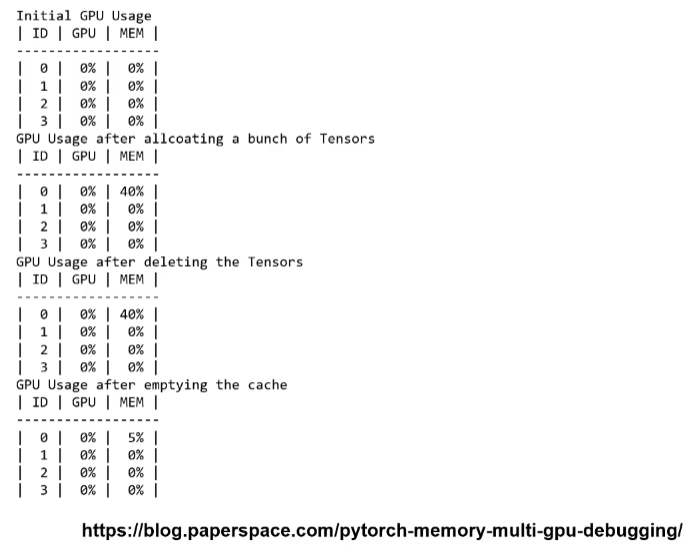
training loop에 tensor로 축적되는 변수 확인할 것
- tensor로 처리된 변수는 GPU 상에 메모리 사용
- 해당 변수 loop 안에 연산에 있을 때 GPU에 computational graph를 생성(메모리 잠식)
- 1-d tensor의 경우 python 기본 객체로 변환하여 처리할 것
total_loss = 0
for i in range(10000):
  optimizer.zero_grad()
  output = model(input)
  loss = criterion(output)
  loss.backward()
  optimizer.step()
  total_loss += loss
del 명령어를 적절히 사용하기
- 필요가 없어진 변수는 적절한 삭제가 필요함
- python의 메모리 배치 특성상 loop이 끝나도 메모리를 차지함
가능 batch 사이즈 실험해보기
- 학습시 OOM이 발생했다면 batch 사이즈를 1로 해서 실험해보기
oom = False
try:
  run_model(batch_size)
except RuntimeError: # out of memory
  oom = True
if oom:
  for _ in range(batch_size):
    run_model(1)
torch.no_grad() 사용하기
- Inference 시점에서는 torch.no_grad() 구문을 사용
- backward pass 으로 인해 쌓이는 메모리에서 자유로움
with torch.no_grad() :
	for data, target in test_loader:
		output = network(data)
		test_loss += F.nll_loss(output, target, size_average=False).item()
		pred = output.data.max( 1 , keepdim=True)[1]
		correct += pred.eq(target.data.view_as(pred)).sum()
예상치 못한 에러 메세지
- OOM 말고도 유사한 에러들이 발생
- CUDNN_STATUS_NOPT_INIT이나 device-side-assert 등
- 해당 에러도 cuda와 관련하여 OOM의 일종으로 생광될 수 있다!
그외..
- colab에서 너무 큰 사이즈는 실행하지 말 것(linear, CNN, LSTM)
- CNN의 대부분의 에러는 크기가 안 맞아서 생기는 경우
(torchsummary 등으로 사이즈를 맞출 것) - tensor의 float precision을 16bit로 줄일 수도 있음
728x90
반응형
'Ai_tech_5기 > 2주차 PyTorch' 카테고리의 다른 글
| 강의 복습내용 [week2-7] Multi-GPU 학습 (0) | 2023.03.16 |
|---|---|
| 강의 복습내용 [week2-5] 모델 불러오기 (0) | 2023.03.14 |
| 강의 복습내용 [week2-4] PyTorch Datasets & Dataloaders (0) | 2023.03.13 |
| 강의 복습내용 [week2-3] AutoGrad & Optimizer (0) | 2023.03.13 |
| 강의 복습내용 [week2-1] 파이토치 기초 (0) | 2023.03.13 |


댓글 영역